
Interactive example · fictional values
Try a project budget.
Change the figures and see the arithmetic balance. A small example of how a custom dashboard can make data readable.
AI & digital solutions / Marco Episcopo
From visual communication to applications, dashboards and work organization. I use AI to turn real needs into images, tools and repeatable processes.
Explore the projects ↓Explore · try · define
Choose a need. Explore a possible deliverable. Prepare a first brief.

Visual communication

Costs & planning

Tasks & deliveries
Interactive example · fictional values
Change the figures and see the arithmetic balance. A small example of how a custom dashboard can make data readable.
From an idea to a first conversation
The file is generated on your device. You can review it and send it when you contact me.
An idea, a brief, a useful outcome
A good AI project begins with a clear need: presenting a product, keeping track of a delivery or understanding a set of costs. My role is to translate that need into a visual direction or a tool people can actually use.
I combine visual design, custom development and iterative testing. We define the expected output first, then the materials, functions and checks needed to reach it.
Find your starting point ↓
Concrete collaboration proposals
These are examples of projects we can scope together. Each proposal starts with your process, your available materials and a clearly defined deliverable.
A launch needs a coherent visual idea across several channels.
Start with a brief, brand references and an approved product image. I develop visual directions, select a coherent concept and adapt the composition for a website, a social post and a presentation.
A moodboard, selected visual direction and agreed final formats.
Recurring costs and upcoming deadlines are scattered across several files.
Bring a spreadsheet of costs, deadlines and objectives. Together we define the categories, calculation rules and useful indicators; I build a prototype and check it using sample data before adapting it to the agreed dataset.
A dashboard, documented calculation rules and a sample import file.
Many projects run at once, with feedback arriving in different places.
Map the steps of a job: brief, production, review and delivery. I structure tasks, notes and checklists, with priorities and a clear view of what remains to be done.
A configured planning tool, reusable project template and usage guide.
Finding the right version takes longer than the actual task.
Define which folders may be indexed and how projects are named. I design a prototype for finding files and relating them to their project, keeping the existing archive structure as the starting point.
An agreed archive structure, search prototype and naming guidelines.
People need a clear view of what is still required and what is complete.
Turn a recurring list into a simple shared workflow: items to add, responsible people, completion and a summary of outstanding work. The shopping-list application is a concrete starting point for the interface.
A list or checklist prototype, agreed fields and practical usage examples.
You want to try AI on a concrete task before extending it to a whole process.
Choose one repeated activity and work through examples together. I prepare an initial prototype or reusable instruction set, define where human review is needed and test the output against agreed cases.
A small pilot, example cases, review criteria and operating instructions.

A visual example
This fictional lamp illustrates the kind of visual atmosphere we can explore during a concept phase: lighting, materials, setting and composition working together.
For a real catalogue product, the approved photograph or controlled 3D model remains the reference. We check the silhouette, finishes and details before agreeing the final images.
From personal needs to practical projects
ECONOMIA, AgendaPC and ProjectOS grew from everyday needs: organizing money, tasks and work assets. Alongside them is the shopping-list project.
AI supports analysis, development, iteration and checks. An application developed with AI does not necessarily use AI internally. The catalog distinguishes applications, documented projects and workflows.
4 projects shown
Personal application
Budgeting and planning, in one tool.
An application developed with AI support to organize transactions, recurring costs, funds and purchase goals. Its rules start with the real needs of the person using it.
The same approach can inform a dashboard of costs, deadlines and goals for a freelancer or small business.
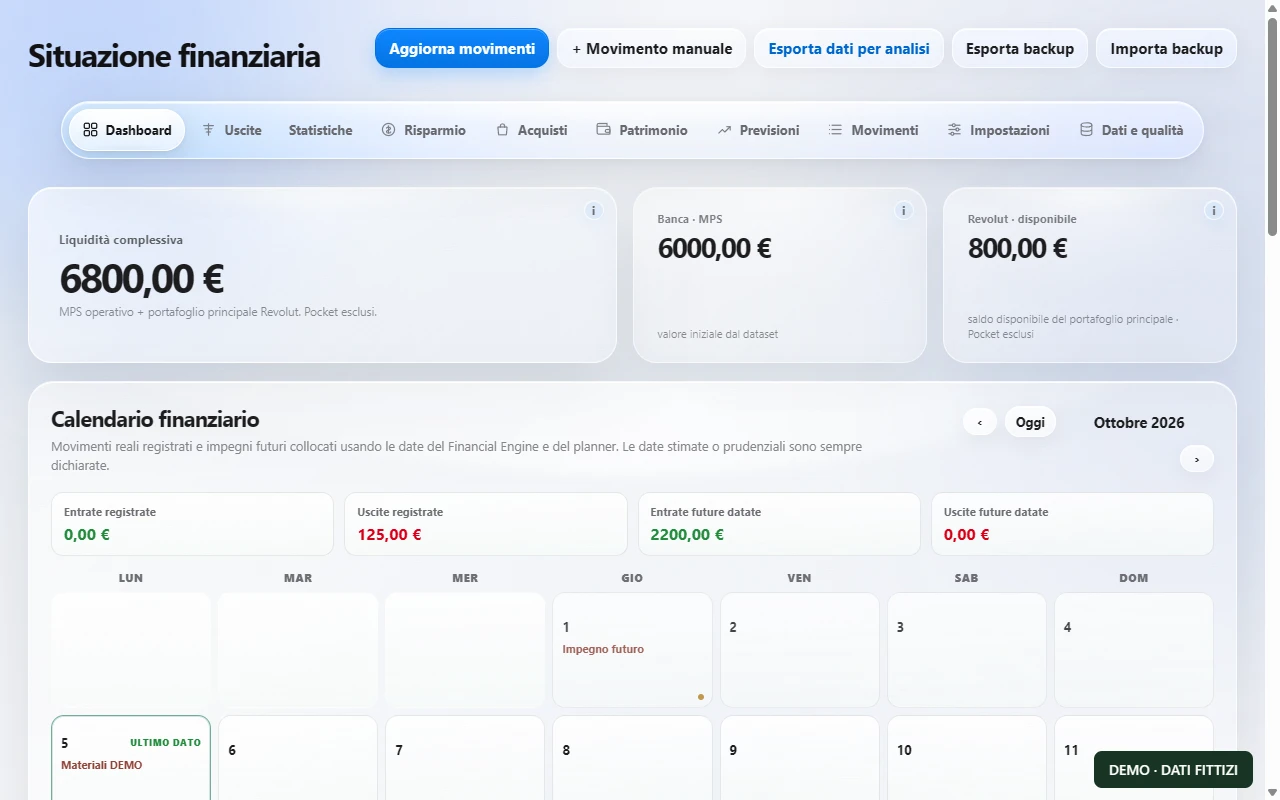
Dashboard with fictional liquidity of €6,800, recording a €125 DEMO expense, transactions, savings and forecasts. All dataset values were created for this demonstration.
Desktop application
Tasks, notes and checklists built around the work.
A desktop agenda shaped around daily tasks. Notes and instructions can be organized into sections and checkable items while preserving the original text.
A practical foundation for managing revisions, deliveries, procedures and recurring studio tasks.
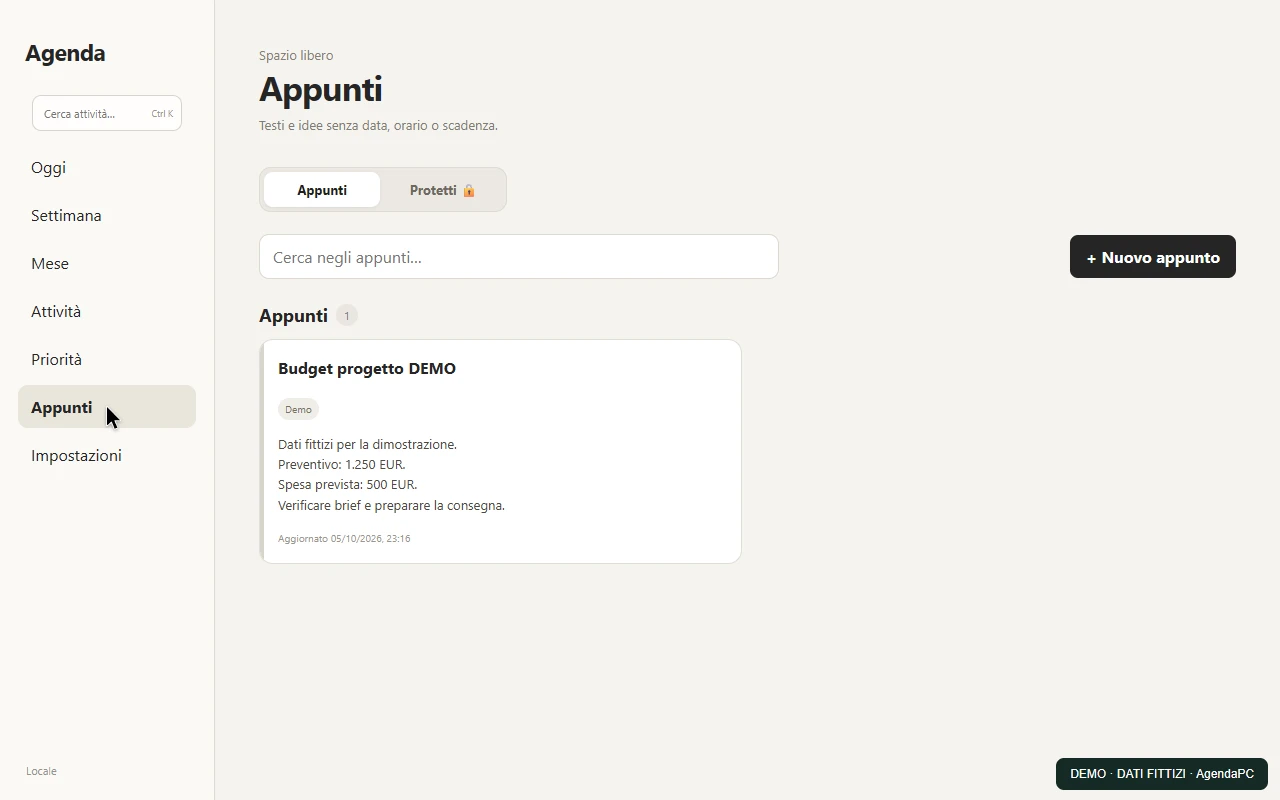
Task creation, calendar, notes and completion, using fictional amounts of €1,250 and €500. This demonstrates task organization.
Desktop application
Find the files. Reconstruct a project’s history.
A tool for organizing work assets and making them easier to find. It connects authorized directories, files, projects and timelines, with search and snapshot management.
Built for workflows with many renders, revisions and documents: finding an asset should not mean losing its context.
Web application
Organize what you need before buying.
A browser-based shopping list with product management and user selection. Items can be added, completed, restored and removed.
A starting point for supply lists and operational checklists.
Adding four DEMO products, switching users, completing and restoring items. Recorded from a local copy with fictional users and online synchronization disabled.
These are personal projects and development workstreams, not commissioned client case studies. Documented projects describe a direction; they are not presented as off-the-shelf products.
Applications · data · processes
Small web or desktop applications with agreed screens, data and rules. A concrete prototype comes before the full implementation.
Agendas, registers, document tools and operational interfaces.
DeliverableA working prototype, agreed features and usage documentation.
Bring data, deadlines and goals into a clear interface, with calculations and views defined around the need.
Costs, recurring activities, goals and project status.
DeliverableA dashboard with defined data, checked rules and import/export where agreed.
Checklists, project archives and search tools designed around how people actually work.
Studios and professionals managing many files, revisions and deliveries.
DeliverableAn organized workflow, configured tools and practical instructions.
Targeted scripts, reusable templates and AI-supported research or document workflows, with human review at the agreed points.
3D production, reports, source collection and document preparation.
DeliverableScripts or reusable workflows, examples and checks against agreed cases.
3D + AI + art direction
I combine a 3D approach with generative tools to explore settings, refine images and develop visual content. Every project starts with a brief and ends with a selection and finishing process.
When a product must remain exact, I use its original image or a controlled 3D render as the basis for compositing.

What we can create
Lifestyle scenes, gardens, terraces and interiors built around a product photo or render.
For catalogues, websites and presentations.
DeliverableSelected images, composed and refined around the approved direction.
Selective editing of reflections, distracting elements, backgrounds, vegetation and furnishings.
For existing renders and photographs.
DeliverableRetouched images, with the agreed changes checked individually.
Moodboards and studies of atmosphere, lighting and materials to compare creative directions.
For design teams, architects and brands.
DeliverableA curated visual study to support a creative decision.
Coordinated settings and compositions adapted for web, social and campaign formats.
For product launches and visual communication.
DeliverableA set of visuals in the formats agreed in the brief.
Short sequences from an approved image, with a defined camera direction, atmosphere and final edit.
For websites, social and presentations.
DeliverableEdited clips, reviewed for product consistency and visual artefacts.
The process
The real need, users, available assets and constraints.
A first working tool or visual direction to test together.
Functional cases, data, details and iterations on the agreed scope.
Final files or application, with usage instructions and agreed next steps.
Before we begin
The catalog includes personal applications, documented projects and workflows. A business adaptation starts with requirements and an agreed prototype.
Yes. A spreadsheet, checklist or repeated task can be a useful starting point. The initial analysis defines what to keep and what to implement.
Product photos or renders, brand references, the intended use and required formats. We agree on any additional assets in the brief.
Generative tools can alter details. For exact geometry, logos and finishes, controlled CGI and compositing are the preferred approach. Outputs are checked against the references.
After reviewing the assets and goal, I define the proposed output, revisions, timing and estimate. Each project has its own scope.
Your next project
Tell me what you want to communicate, organize or simplify.
Discuss your project ↗